←Back to Works
WEB / CHROME EXTENSION·2026
1 / 3
PlatformWEB / CHROME EXTENSION
Release Year2026
StatusACTIVE
DistributionChrome Web Store
PEEKUI
[ CONCEPT_VISUALIZATION ]
The Concept
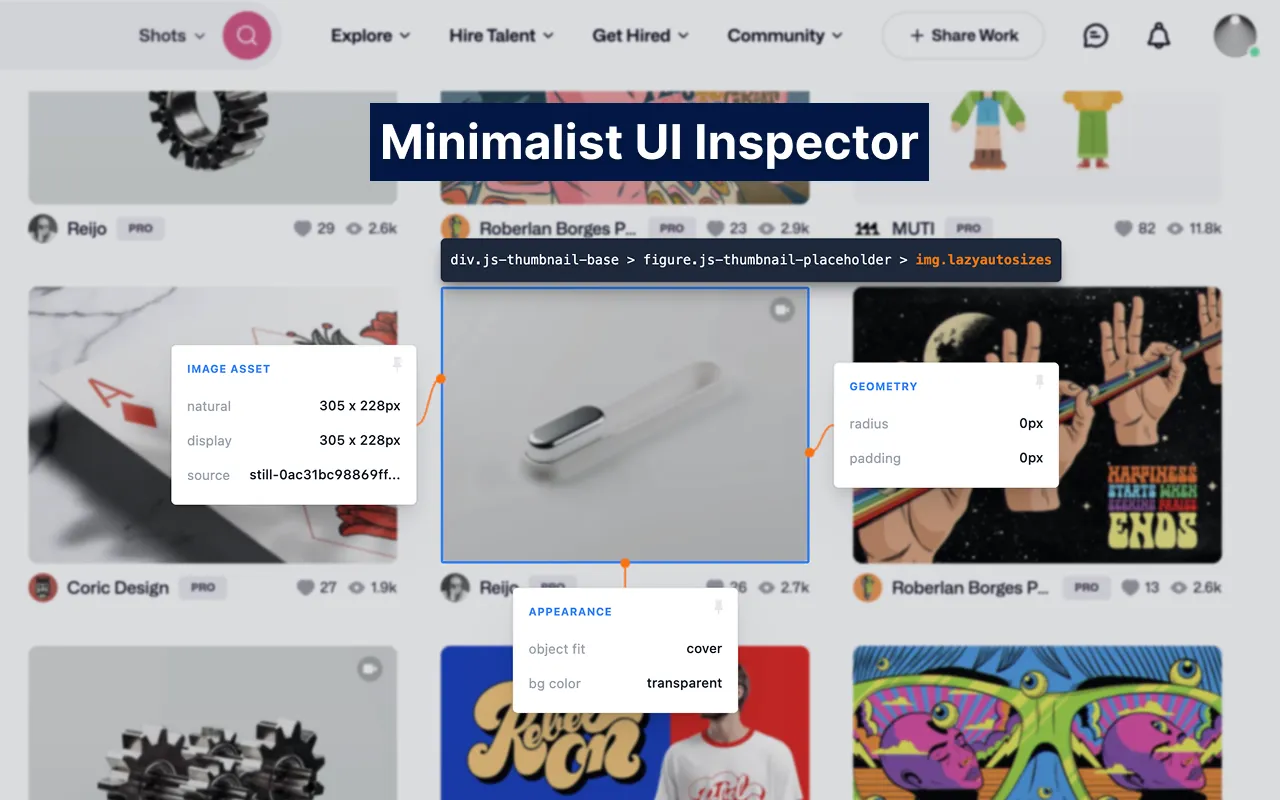
I built PeekUI because I was tired of opening the heavy, cluttered browser DevTools just to check a hex code or copy a button's styling. PeekUI is a lightning-fast, keyboard-driven Chrome extension designed to help developers and designers seamlessly inspect, edit, and collect web UI components right on the page.
Embracing a Swiss-inspired, minimalist design philosophy, it stays out of your way until you need it, providing a highly visual and focused workflow.
Key Features:
- Keyboard-First Workflow: Press
Alt + Xto instantly toggle the inspector crosshair without reaching for the extension icon. - Inspiration Stash: Found a beautiful UI component? Press
Ctrl + Sto save it locally. The built-in Stash popup automatically generates visual thumbnails (including gradients and images) for quick scanning. - Live Editing: Double-click any property to modify it on the fly. Edited values turn vibrant orange, creating a clear visual distinction between original and modified states.
- Figma-like Measurements: Hold
Altwhile inspecting to instantly view pixel-perfect distances between DOM elements. - Smart Export: One-click copy for raw CSS or Tailwind CSS classes.
- DOM Breadcrumbs: Navigate complex nested elements easily with the top-left breadcrumb badge and keyboard arrow keys.
The Tech
Built with vanilla JavaScript and the Chrome Extension API (Manifest V3), focusing heavily on performance, DOM manipulation, and executing seamless UI overlays without disrupting the host website's layout.
[ END_OF_SPEC ]